
Webex Navigator runs UMA at the door.
The room status panel outside every meeting room becomes the UMA booking surface. Branded, live and one-touch, built on the Webex hardware you already specified.

The panel that's already on the wall
Re-skin the Navigator. Keep the hardware.
UMA · Cisco · Navigator 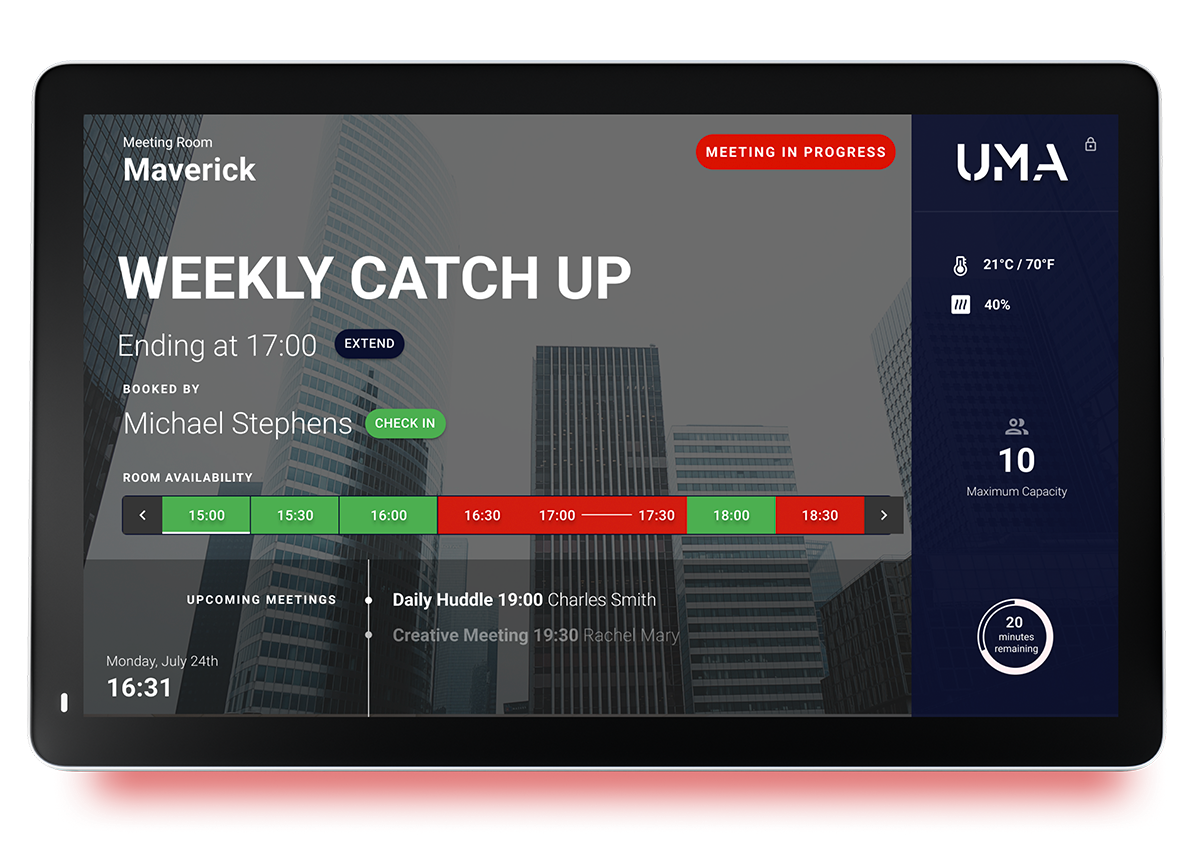
Webex Navigator · UMA app
Custom-branded UMA on every door, with the live data the room actually carries.
UMA is a native application on Cisco Webex Navigator. Your wordmark, your palette and your meeting copy, sitting on the same panel the IT team already deployed and supports. No second screen, no parallel booking app to roll out to staff.
Book a Demo What it does
Everything the room needs, on the panel.
The Navigator stops being a calendar mirror and becomes a workplace surface: live, branded, and tied to the operations team's policy.
- 01Branding · Theme
The Navigator carries your wordmark, colours and copy. Lobby tone in reception, board tone outside the boardroom. The same panel, dressed for the room.
- 02Live capacity
People-count, environmental score and availability status surface on the panel in real time, driven by the sensors and codecs you already run.
- 03One-touch booking
Extend, release or reserve from outside the door. Calendar two-way sync to Outlook / Google, so the change lands in the host's diary instantly.
- 04Configurable rules
Auto-release no-shows, hide private events, surface a "next available" suggestion. All policy, no rebuilding the panel firmware.
Calendar & video
Two-way sync with the calendar your team already lives in.
UMA · Outlook · Google · Webex


Bookings flow in both directions
Book on the panel, see it in Outlook. Decline in Outlook, the room releases.
Outlook, Google and Webex calendars feed UMA, and UMA feeds them back. No drift between what the panel says and what the diary holds. The Webex video link is attached automatically. The smart scheduler reads everyone's availability and proposes a slot that actually works.
See Integrations